Tech Story: Building My Spotify Playlist Site

Five months ago, in June 2025, I set out to solve a problem I was having in my life: "How do I share my music tastes, or more specifically, the massive library of playlists I have, with someone who does not use Spotify?"
I decided to challenge myself with a code project that would teach me how to work with the Spotify API, and I would use "vibe coding" as a helping hand with building this website. This blog serves as a technical journey into my experience vibe coding and how I put it all together. The code for this site is hosted at this GitHub Repo.
If you, instead, want to hear my life's story with coding, I wrote about it previously here.
The Vibe Coding Workflow
Initially, I was using a combination of ChatGPT and GitHub CoPilot in VSCode to power my coding process. I would ask questions about what tools and frameworks I could use to build what I wanted. Eventually, I'd use these chats to guide me with implementing pieces of the backend and frontend.
Partway through this, I pivoted from using ChatGPT to using Perplexity. Perplexity offered "Spaces", a convenient way to organize my threads by project, and due to its prioritization of citing sources, I tended to trust the output a lot more.
I would ask questions ranging from how to debug certain issues to how to build out certain features. All of this was a learning journey as I was able to find the answers to my questions much quicker than if I had to scour through documentation myself. At times, I still needed to look up something myself in the search engine, but for the most part, I was able to rely on the LLM to provide what I was looking for.
The System Design
I ended up settling on a Next.js -powered project, as I wanted to use TypeScript to build out the site.
Next, I decided I'd focus on setting up the bare bones of a website using the themes from my existing personal portfolio site, which was built using Webflow. I was able to take the CSS from the Webflow project to use in this playlist website. This helped me quickly implement the background gradient and the text styling.
Working with the Spotify API
To pull this project off, I had to learn about the Spotify API and figure out the data flow of the backend. The main questions I had to answer were: "How would the website get the playlist data to show the proper embeds?" and "How would I handle updates to my Spotify playlists?"
For the first question, I had to set up the Spotify Developer project and connect the API properly so that I could use code to get the necessary data. I soon realized in testing that I had to limit the number of Spotify API calls I was making, and figured out that I would need to use a database to hold the playlist data I was pulling from Spotify through their API. I eventually chose to store all of the playlistIds in a Firebase Firestore, so that I could pull the data from the database instead.
To handle any updates to the Spotify playlists, I decided to use Netlify to run daily batches. It would call the Spotify API once every day to update the Firebase Firestore. That way, I wouldn't exceed Spotify's rate limits. Firebase had a much higher rate limit, so it was able to handle the load I expected for my website.
Browser Caching
Because I had so many playlists I needed to load on the web view of the site, I decided I wanted to implement browser caching. This means that each refresh wouldn't need to pull a fresh set of data. This would all help reduce the number of API calls that would be made.
Implementing this functionality would also eventually lead to a friend telling me that their iPhone was crashing when opening this site, so I ended up deciding on a different UI/UX for mobile. This will be discussed in more detail in the next section.
Building Incrementally
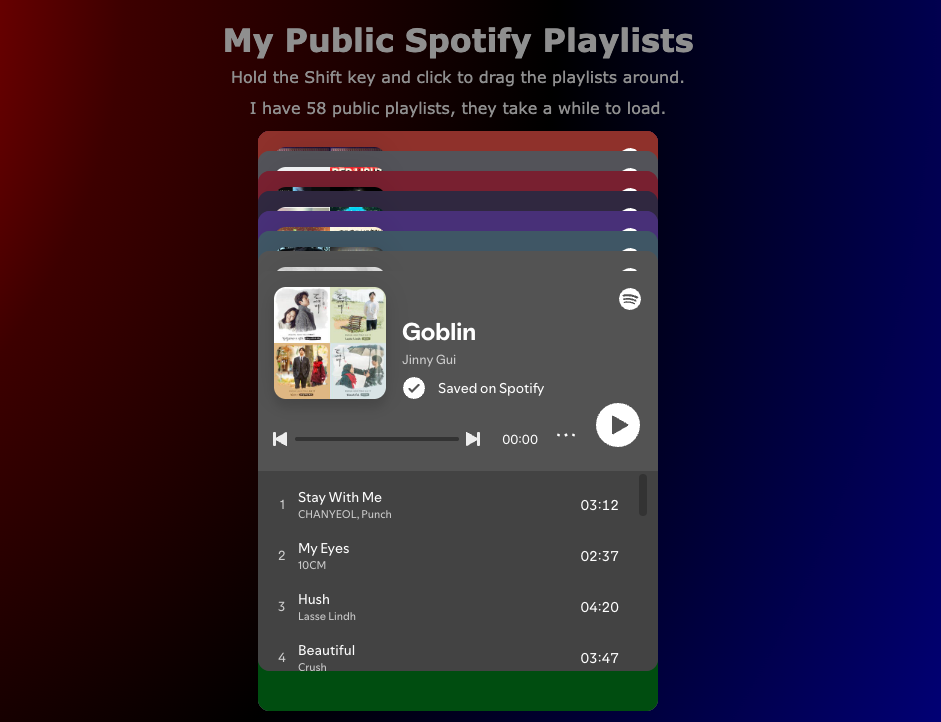
As I was building my site, I decided I wanted to flesh out the desktop version first. One of the more fun parts of this project was deciding how I wanted the UI/UX to look and feel. I wanted it to be silly. Instead of scrolling through a list of playlists or a portfolio catalog, I wondered, "Why not make a pile of playlist embeds and allow the user to click and drag them around?"
Quirks of iFrames and Spotify Playlist Embeds
Working with iframes and playlist embeds proved to be challenging. I needed to be able to have the iframe be interactive so that the music could be played and the songs could be scrolled through while also allowing the embed itself to move.
Initially, I wanted it to be a long hold of the mouse to trigger the click and drag– but after much debugging with the help of Copilot and Perplexity, I settled on adding a keyboard trigger with some instructions to help make the interaction easier to implement. (One of my friends who tested out the site when the desktop version was done said that multiple playlists can be played at the same time– an unintentional, silly quirk.)
Building the Mobile View
While testing the web view, I initially also had mobile show the same thing, but eventually had a friend tell me that their phone was crashing. It wasn't crashing on my Android, but it certainly was an issue I needed to resolve.
Due to this, I had to switch up the UI/UX of the mobile experience. After considering a few different options, like a scrolling view of all the playlists, I decided to make it a deck of cards that could be swiped left and right. The same quirks with iFrames came up while implementing this view as well. I wanted to initially make it a timed click (or tap) and hold, but eventually had to add a button to toggle between interaction modes.
Animating with Spring API
One of the fun parts of making this mobile view was learning how to work with animating the flick and playlist embed card animations. While I was "vibe coding" and essentially getting the code provided to me, I also simultaneously looked at the documentation to get a sense for how each function operated. I now understand why people will refer to "the physics of a video game" because there is some amount of math that goes into animations like these. The video below demos this flicking in the mobile view.
Mobile View of site.
Learnings and Reflections
My takeaway from this project is that vibe coding is ultimately a tool to help speed up the learning process of code. It also speeds up the execution of physically typing things out, but it's so crucial for the developer to understand the output provided by these LLM-powered tools.
I was able to learn a lot about different frameworks and libraries while putting this together, and now have a fun way to share my music tastes with people I meet. It took me a long time to go from finishing the web view to finishing the mobile view, but ultimately, I'm glad that I was able to settle on a mobile view UI/UX that I enjoyed and am happy with.
This was my first ever "for fun" coding project, and I'm unsure if I'll do another one in the near future. However, finishing this website gave me the confidence that I will learn the skills I need to pull off what I want to create. At the end of the day, I am a builder.